Time tracking for Android

Clocks in by itself. Free.

WorkFlow notices when you arrive at your workplace and tracks your hours automatically. No account, no cloud, no ads.

  • No always-on GPS, no movement profile
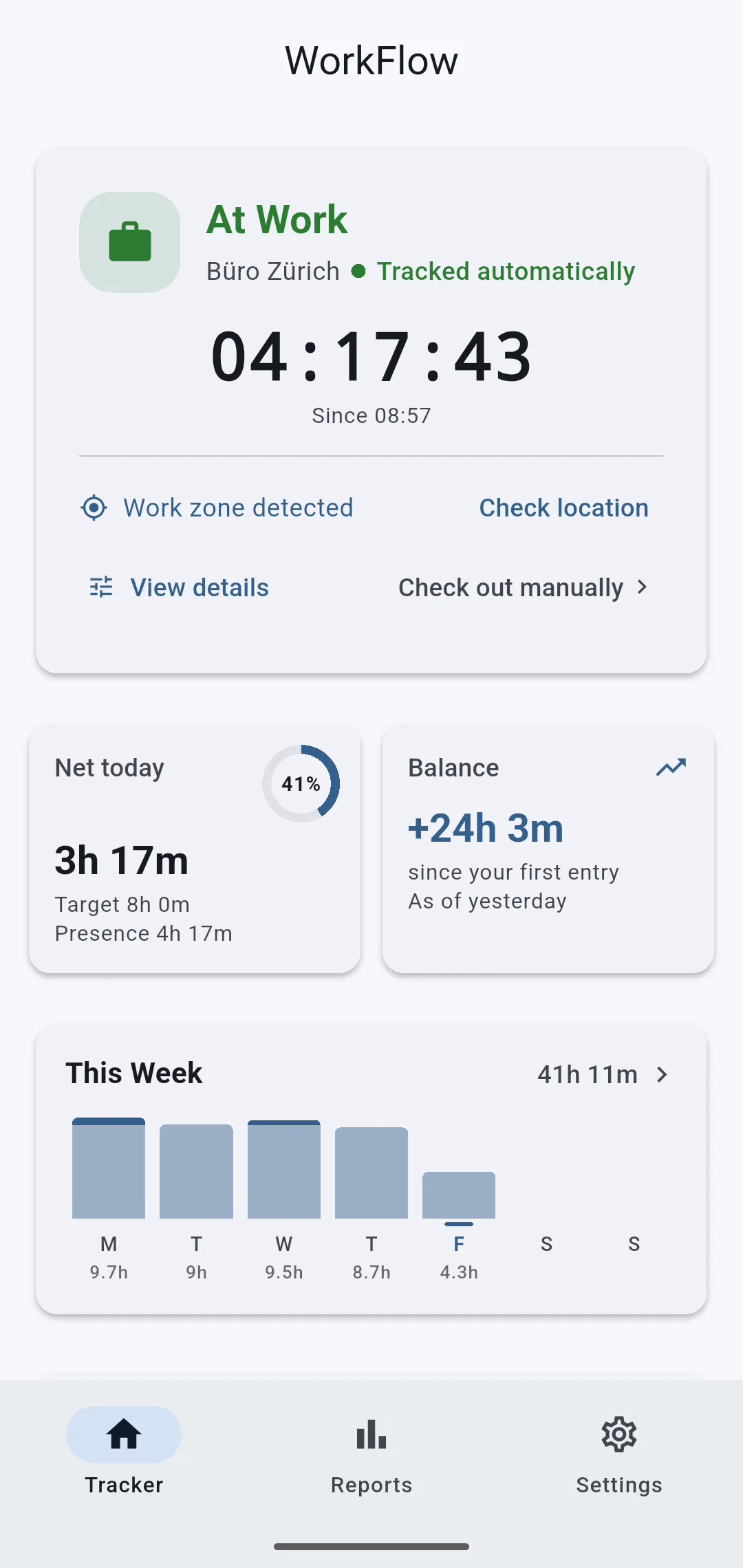
WorkFlow dashboard: at work, timer running since 08:57, net today and balance
  • Android 8+Android 8 Oreo or newer
  • English & GermanApp and reports in both languages
  • Up to 5 workplacesOffice, client, second site
  • PDF & CSVTimesheets ready to sign
The two fair worries

Easy on the battery. No constant tracking.

Both come up the moment we say "automatically by GPS", so here is plainly how WorkFlow works.

Automatic, without always-on GPS

  • Android reports arriving and leaving. WorkFlow does not poll your location; it registers your workplace with the system's geofencing service.
  • WorkFlow also checks about every 15 minutes. That needs background location access and suitable battery settings; reports can be delayed.

Hours stay local, no route history

  • Hours and workplaces stay on your phone. What is stored is arriving and leaving. The app keeps no route history.
  • Only the map talks to the outside. During setup it loads tiles from OpenStreetMap and sends address searches. Exports and backups are yours to share.
How WorkFlow clocks, what Android reports, what is stored. Recorded from the app in the Android emulator with sample data, time compressed; the simulated position stayed inside the work radius. Automation needs background location access, reports can be delayed. Map and address search: OpenStreetMap.
Video transcript
  1. Forgot to clock in?
  2. WorkFlow takes care of that.
  3. Android reports when you arrive or leave.
  4. WorkFlow uses no constant GPS, but it does need background location access.
  5. On top, the app checks about every fifteen minutes.
  6. It never stores your route.
  7. And you can pause the automation.
  8. Your times stay on your phone.
  9. You share your timesheet yourself.
  10. No account, no ads.

More on how the geofencing works in detail →

How it works

Set it up once, then it runs.

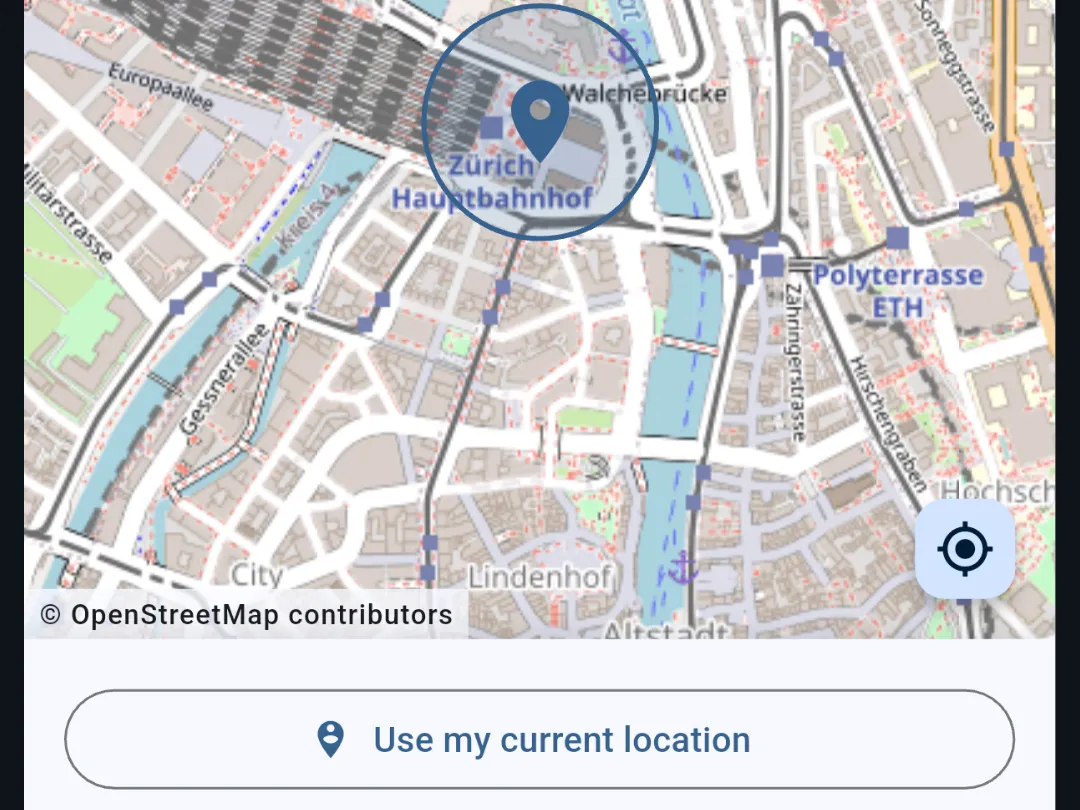
  1. Map with the workplace Zurich main station and its radius, below it the button Use current location

    Set your workplace

    Search an address or tap the map, pick a radius, allow background location. Up to five places, say office and a client site.

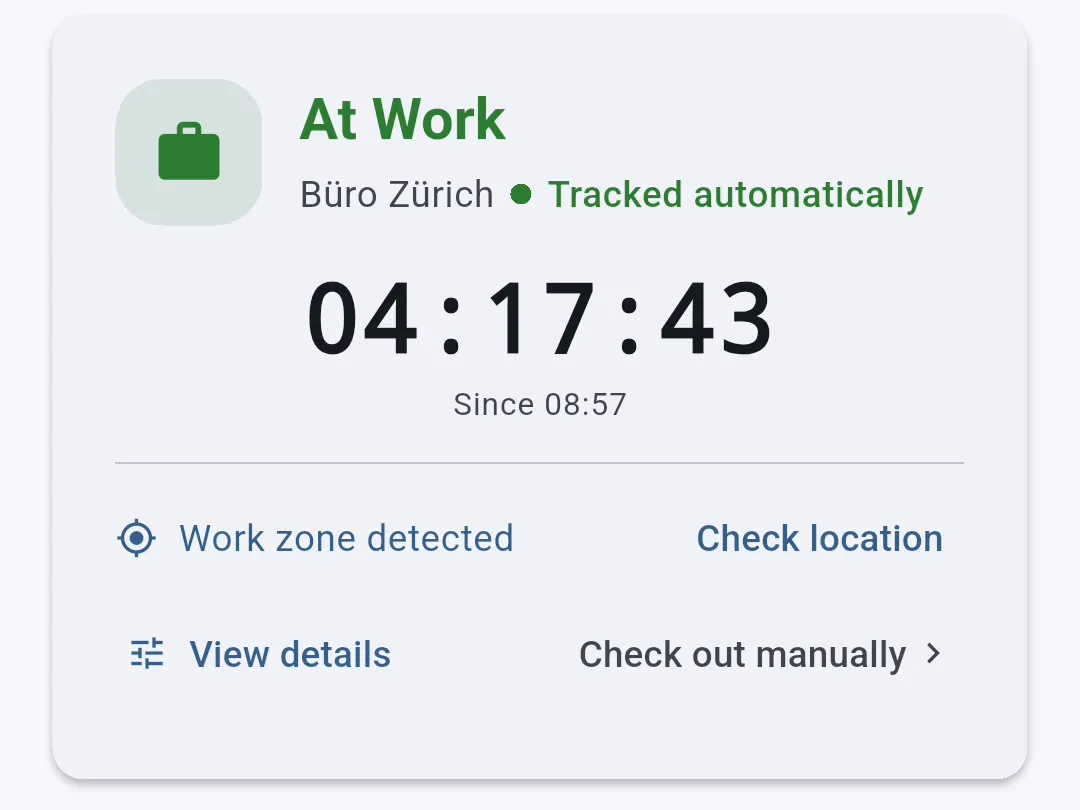
  2. Status card At work, Zurich office, tracked automatically, timer 04:15:59

    Arrive

    Enter the radius and WorkFlow clocks you in. Leave it and it clocks you out. You can adjust manually at any time.

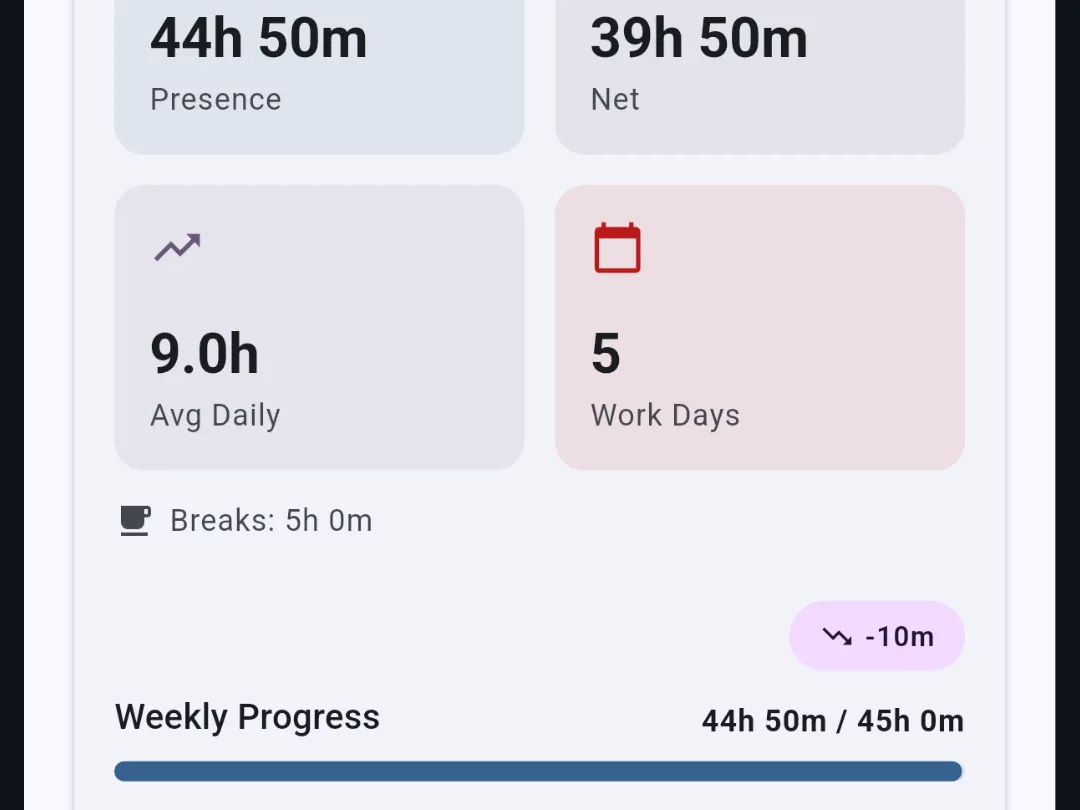
  3. Weekly report: 44h 50m presence, 39h 50m net, 5 work days, weekly progress

    Read your reports

    Net today, overtime balance, week, month, year. At month end the timesheet as PDF or CSV.

Overtime

Overtime, counted automatically.

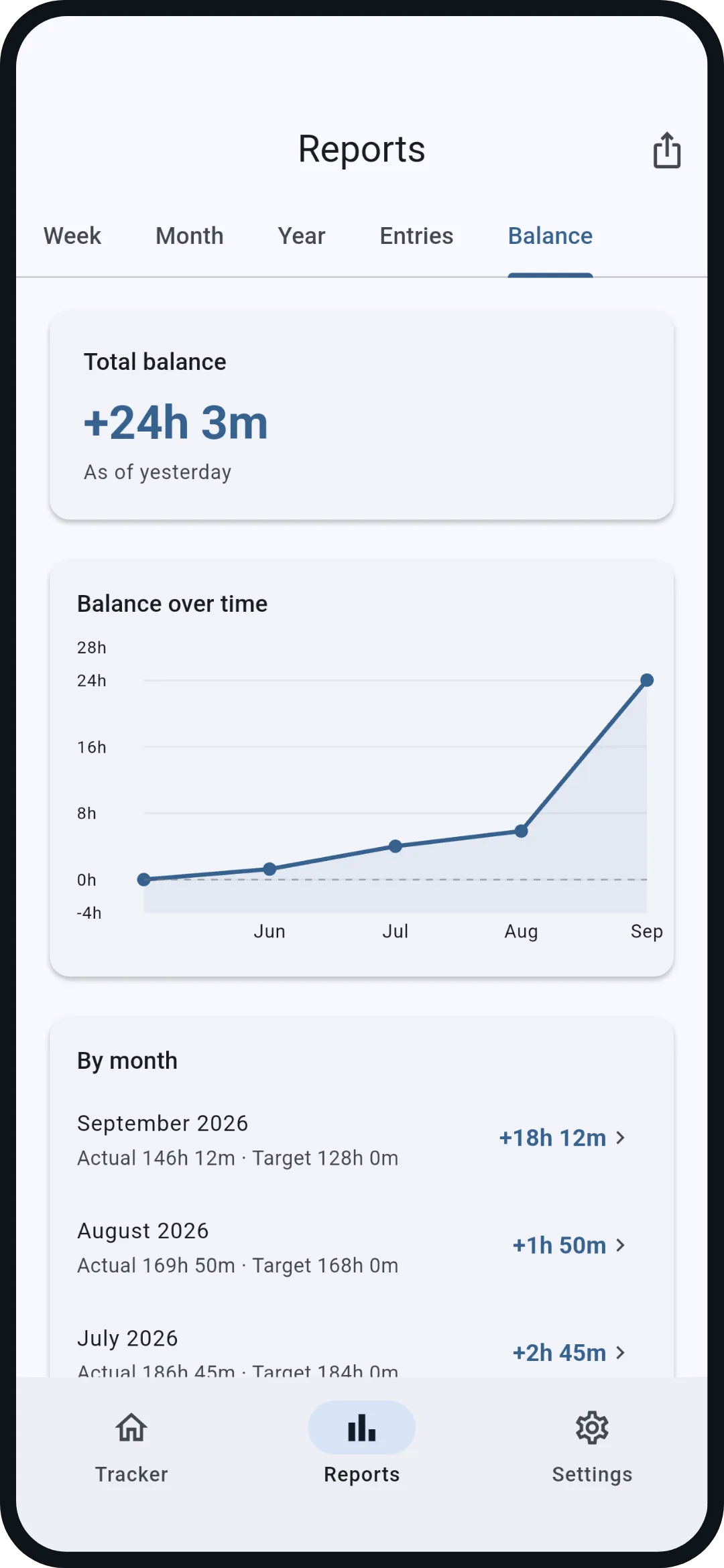
Your balance runs from the first entry. Daily target from your schedule, vacation and public holidays lower the target, days off never count as minus.

  • Balance history and breakdown per month
  • Weekly and monthly target with progress
  • Starting balance for switching from another system
Balance tab: total balance +24h 3m and history since June
Month

Your month at a glance.

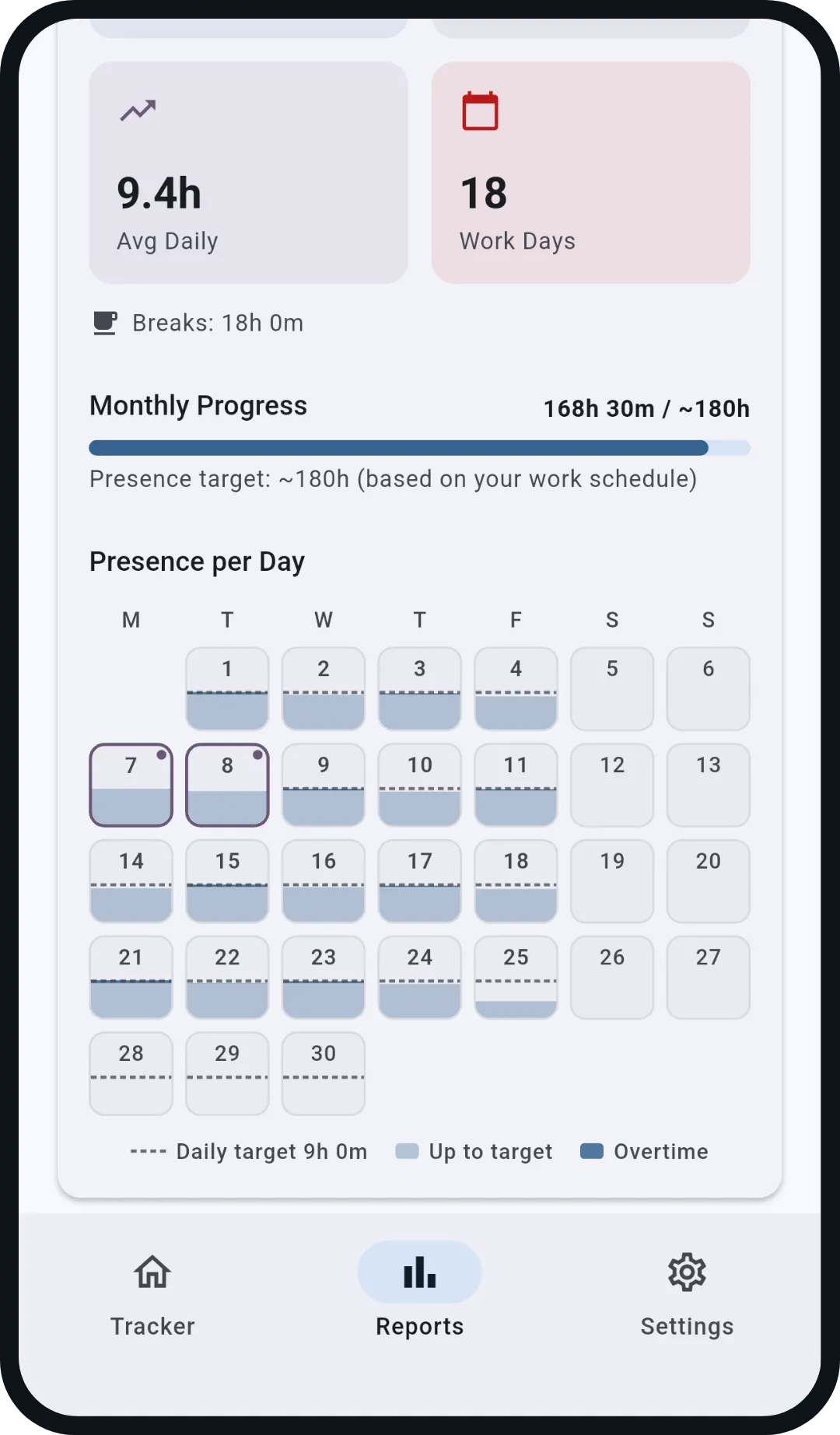
Every day as a fill bar, the daily target as a line, overtime above it in blue. Vacation and holidays are marked. Tap a day to open it, every time is editable.

Monthly report with heatmap: 18 work days, progress 168h 30m of 180h
Export

Timesheets, ready to sign.

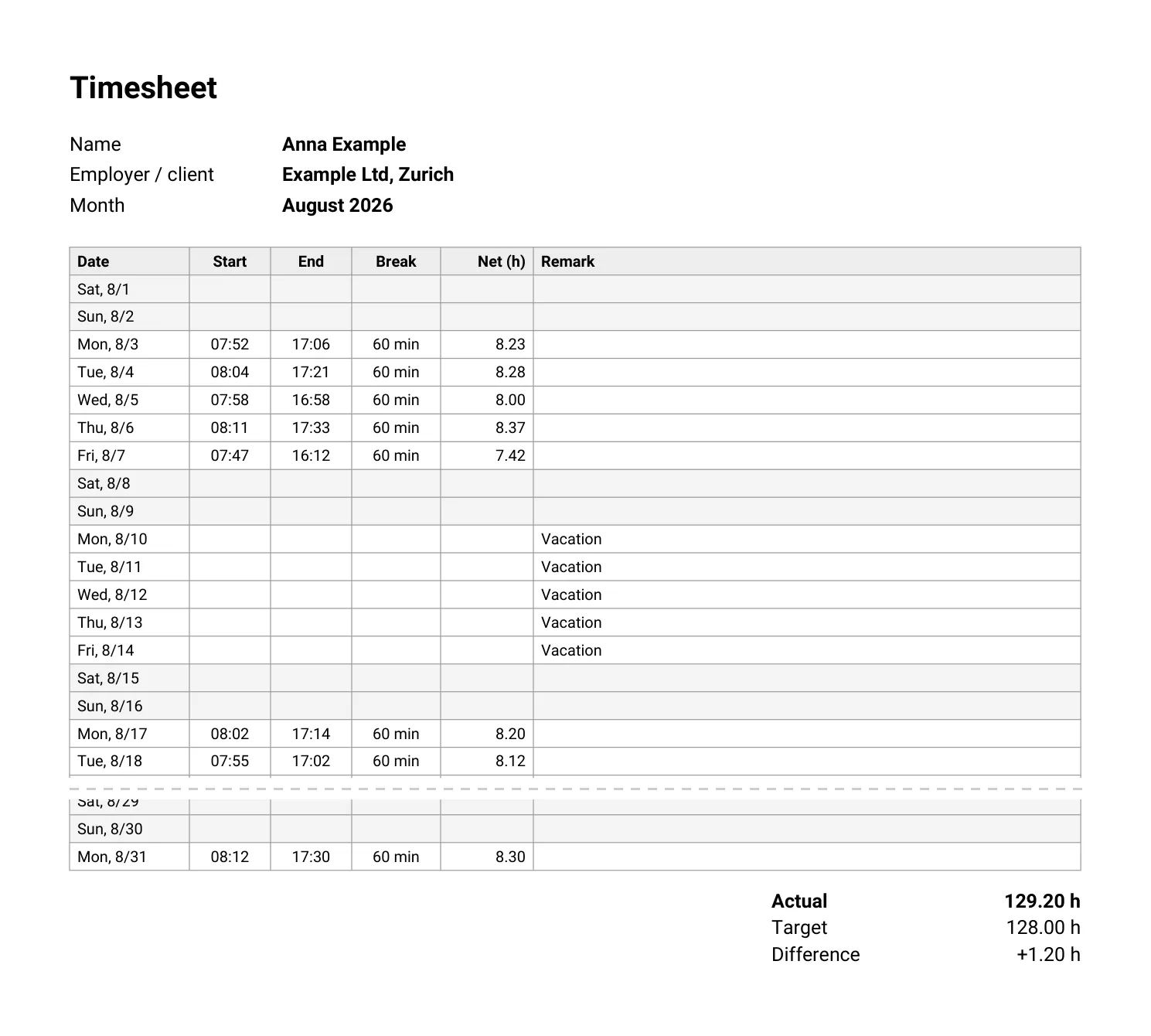
One tap and the month is a PDF with a signature line, or a CSV. For proof of hours, invoices or taxes.

  • Your name and employer on the timesheet
  • Backup as a file, share it or keep it on the phone
  • No upload, no account, no waiting
Get it on Google Play
Sample timesheet August 2026 as PDF: table with start, end, break and net per day, totals actual, target and difference, two signature linesOpen the sample timesheet PDF →
Privacy

No server of its own. So nowhere to go.

"Your working hours cannot go anywhere, because there is no anywhere. I do not even know that you use the app."

WorkFlow is the answer to time tracking apps that upload your hours and locations to someone else's server. Your times and workplaces stay local, and you can export or delete them whenever you want. The only outbound requests: map tiles and address searches from OpenStreetMap, only while you set up a workplace.

App privacy policy →

No analytics, no ad IDs
The app contains no tracking. Neither does this site, only cookieless visit counts.
Location only for the radius
Your position is compared with your workplace, never stored, never sent.
OpenStreetMap for the map
Only while you set up a workplace does the app load map tiles and send address searches to OpenStreetMap; the map service then sees the map area and your IP address. The privacy policy states exactly what is transmitted.
Your backup, your file
Export as JSON, PDF or CSV. Move to a new phone in two minutes.
Compare

What WorkFlow does differently.

Other apps do a lot more. The questions that matter to employees: does it clock in by itself, does it need an account, where does the data end up.

FeatureWorkFlowWorkingHoursToggl TrackClockify
Automatic clocking by GPSIncludedPro only (one-time or subscription)No geofencing in the official appNo automatic clocking; GPS locations on the Pro plan only
Account requiredNoNo, optional sync via your own cloudYesYes
Where your data livesOn the phone onlyDevice, optionally your own cloudVendor cloudVendor cloud

As of 6 September 2026, from the vendors' public pricing and store pages; sources on the comparison page.

Detailed comparison with WorkingHours, Toggl Track, Clockify and timr →

Frequent questions

Short answers.

Does it work when the app is closed?

Yes. Clocking in and out happens in the background, also after restarting the phone. On some brands you need to switch off battery optimisation for WorkFlow; the app shows you where.

What about working from home?

Nothing clocks automatically at home, you are there anyway. Mark the day as home office and enter the hours, also afterwards. The target stays the usual one, so the day counts like an office day.

Is there WorkFlow for iPhone?

Not yet. WorkFlow was built for Android first, because geofencing runs reliably in the background there. An iOS version is planned once there are enough users.

All questions and answers →

Set it up today, clock in automatically tomorrow.

Free, no ads, no account. Ready in a minute.

Get it on Google Play